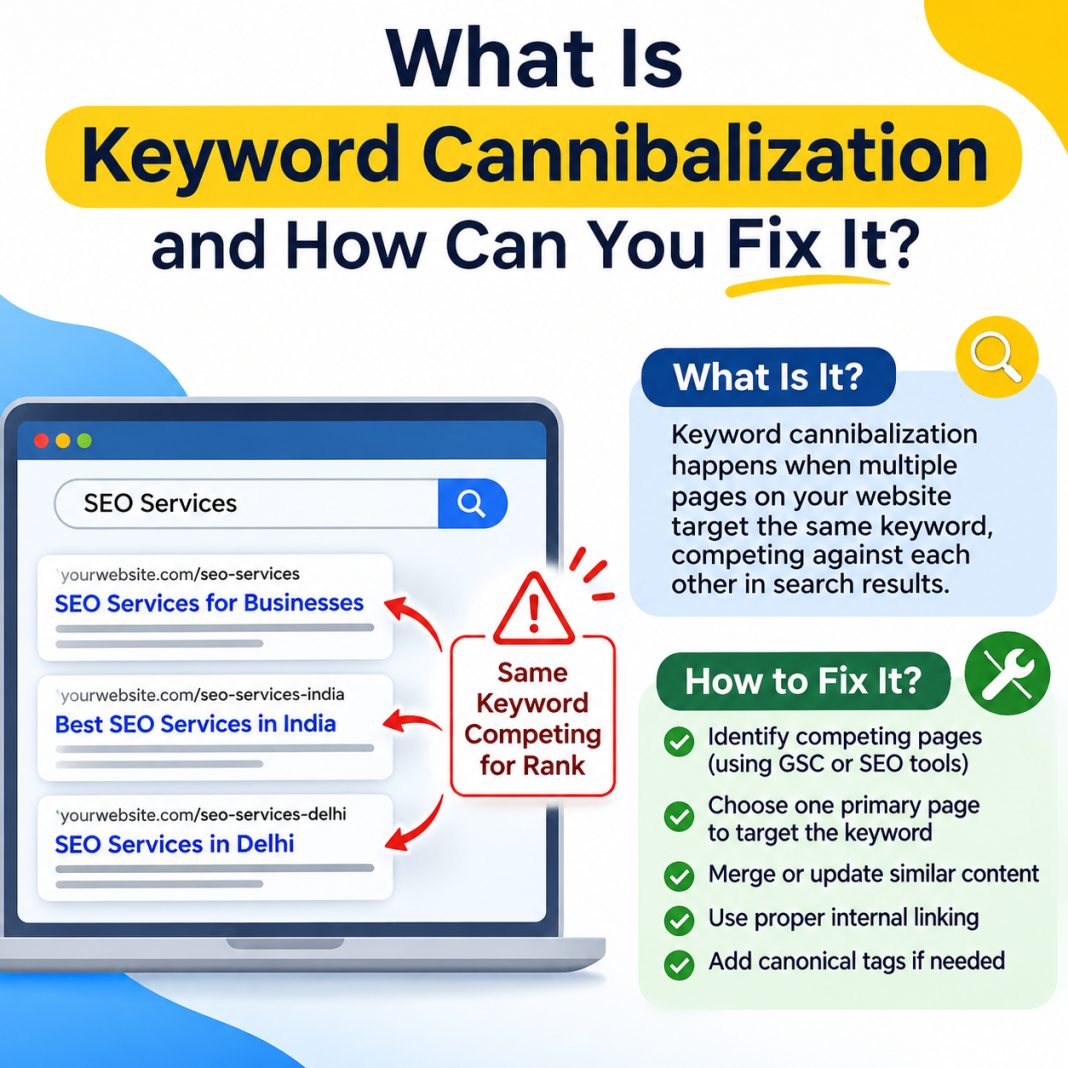

Have you ever published multiple blog posts on similar topics but noticed that none of them ranks well on Google? You might be facing an SEO issue called keyword cannibalization.
Creating more content is generally a good strategy for growing website traffic. However, publishing several pages targeting the same search intent can sometimes create confusion for search engines. Instead of helping your website rank better, these pages may compete with each other in search results.
Understanding this issue is important if you want to build a strong SEO strategy and improve your website’s organic visibility.
In this guide, we will explain What Is Keyword Cannibalization means, why it happens, how to identify it, and what you can do to fix it.
What Does Keyword Cannibalization Mean in SEO?
Keyword cannibalization happens when two or more pages on the same website target the same or very similar keywords and search intent.
For example, imagine you run a digital marketing blog and publish these two articles:
- What Is SEO and How Does It Work?
- A Beginner’s Guide to Understanding SEO
Both articles may target similar search queries and provide nearly identical information. As a result, Google may struggle to understand which page is the most relevant for a particular search.
This can make it difficult for your website to maintain consistent rankings.
However, targeting the same keyword on multiple pages does not automatically mean you have a problem. If each page serves a different purpose and satisfies a different search intent, they can rank independently.
Why Does Keyword Cannibalization Happen?
There are several reasons why websites experience this SEO problem. Understanding these causes can help you avoid unnecessary competition between your own pages.
1. Creating Similar Blog Posts
Publishing multiple articles around the same topic without checking existing content is a common mistake.
For example, writing three different articles about “email marketing tips” may create overlapping content if all three target the same audience and search intent.
2. Poor Keyword Research
Without proper keyword research, content creators may unknowingly assign the same primary keyword to multiple pages.
A clear keyword mapping strategy helps prevent this issue.
3. Duplicate or Similar Content
Sometimes, websites publish content that covers almost identical information using slightly different titles. Although the wording may change, the overall purpose remains the same.
4. Lack of Content Planning
When multiple writers work on a website without a shared content strategy, they may create articles targeting similar keywords.
Maintaining a content calendar can help avoid this problem.
How Does Keyword Cannibalization Affect SEO?
This issue does not always lead to ranking problems, but overlapping pages can create challenges for your SEO performance.
Here are some possible effects:
- Ranking fluctuations: Your pages may alternate positions in search results.
- Reduced organic traffic: Search engines may show a less relevant page instead of your strongest content.
- Backlink distribution: External websites may link to different pages covering the same topic, splitting link equity.
- Poor user experience: Visitors may find similar articles that offer little additional value.
- Content management difficulties: Managing multiple overlapping pages can make your SEO strategy less effective.
The important thing is to identify whether the pages genuinely compete for the same search intent before making changes.
How to Identify Keyword Cannibalization?
Finding overlapping content is easier when you use the right SEO tools and techniques.
1. Check Google Search Console
Google Search Console is one of the most useful free tools for identifying potential ranking conflicts.
Follow these steps:
- Open your Google Search Console account.
- Select the Performance report.
- Click on the Queries tab.
- Choose a keyword you want to investigate.
- Open the Pages tab to see which URLs receive impressions and clicks for that query.
If multiple URLs receive impressions for the same query, investigate whether they serve the same search intent.
2. Perform a Google Search
You can also search your target keyword on Google using the site: operator.
For example:
site:yourwebsite.com SEO tips
This search can help you discover multiple pages related to a particular topic.
Review their content and check whether they overlap significantly.
3. Use SEO Tools
Tools such as Ahrefs, Semrush, and other keyword tracking platforms can help you monitor keyword rankings and identify pages competing for similar queries.
These tools make it easier to understand how different URLs perform over time.
How to Fix Keyword Cannibalization?
Once you identify overlapping pages, the next step is choosing the right solution.
1. Merge Similar Content
If two articles provide almost identical information, consider combining them into one comprehensive article.
Keep the most useful information from both pages and redirect the weaker URL to the stronger one using a relevant 301 redirect.
2. Update Keyword Targeting
Assign a different primary keyword and search intent to each page.
For example:
- Page 1: What Is SEO?
- Page 2: Technical SEO Checklist
- Page 3: On-Page SEO Techniques
This approach helps each article serve a distinct purpose.
3. Use Canonical Tags
Canonical tags tell search engines which URL you consider the preferred version among duplicate or substantially similar pages.
They can help consolidate signals, but they are not a universal solution for pages that simply target related keywords.
4. Improve Internal Linking
Use relevant internal links to help search engines understand the relationship between your pages.
For example, a general SEO guide can link to more specific articles about technical SEO, keyword research, and link building.
5. Remove Unnecessary Pages
If a page provides little value and has no meaningful purpose, consider removing it.
Before deleting any URL, check its traffic, backlinks, and overall importance. Redirect it when an appropriate replacement exists.
How to Prevent Keyword Cannibalization?
Prevention is always easier than fixing content problems later.
Here are a few practical tips:
- Create a keyword mapping sheet before writing new articles.
- Assign one primary search intent to each important page.
- Review existing content before publishing new posts.
- Update older articles instead of creating unnecessary duplicates.
- Conduct regular content audits.
- Maintain a clear website content structure.
Following these practices can help you build a more organized website and maintain a healthy SEO strategy.
Frequently Asked Questions (FAQs)
1. What is keyword cannibalization in SEO?
It occurs when multiple pages on the same website target similar keywords and search intent, potentially competing for visibility in search results.
2. Is keyword cannibalization bad for SEO?
Not always. It becomes a problem when overlapping pages compete for the same search intent and create confusion about which page should rank.
3. How can I check keyword cannibalization?
You can use Google Search Console, Google search operators, Ahrefs, and Semrush to identify multiple URLs appearing for similar search queries.
4. Does keyword cannibalization affect Google rankings?
It can affect ranking performance when competing pages have overlapping content and divide relevance or backlinks. However, multiple pages ranking for related terms are not necessarily harmful.
5. How can I prevent keyword cannibalization?
Use keyword mapping, create unique content, review existing articles, target different search intents, and perform regular website content audits.
Final Thoughts
Creating quality content is essential for SEO success, but publishing more articles does not always mean achieving better rankings.
When multiple pages target the same search intent, they may compete for visibility and make it harder for search engines to identify the most relevant result.
By regularly auditing your website, organizing your keyword strategy, merging overlapping articles, and improving internal linking, you can avoid unnecessary content competition.
Remember, the goal is not to create more pages. It is to create useful content that answers different user questions and provides real value to your audience.