
Managing accounting operations demands accuracy, speed, and a structure that supports teamwork. Many companies rely on QuickBooks Enterprise because it handles large data files, complex financial workflows, multi-location inventory, and advanced reporting. However, running QuickBooks Enterprise on local computers or in-office servers often leads to performance limits, access restrictions, and higher maintenance costs.
QuickBooks Enterprise Hosting places the desktop version of QuickBooks Enterprise on a cloud server instead of a physical machine in your office. You still use the same software, interface, and features; only the infrastructure changes. By moving it to the cloud, you gain mobility, improved security, and reliable performance without changing your accounting workflow.
Companies that choose QuickBooks Enterprise hosting gain cloud-level flexibility while keeping the power of the desktop version.
What Is QuickBooks Enterprise Hosting?
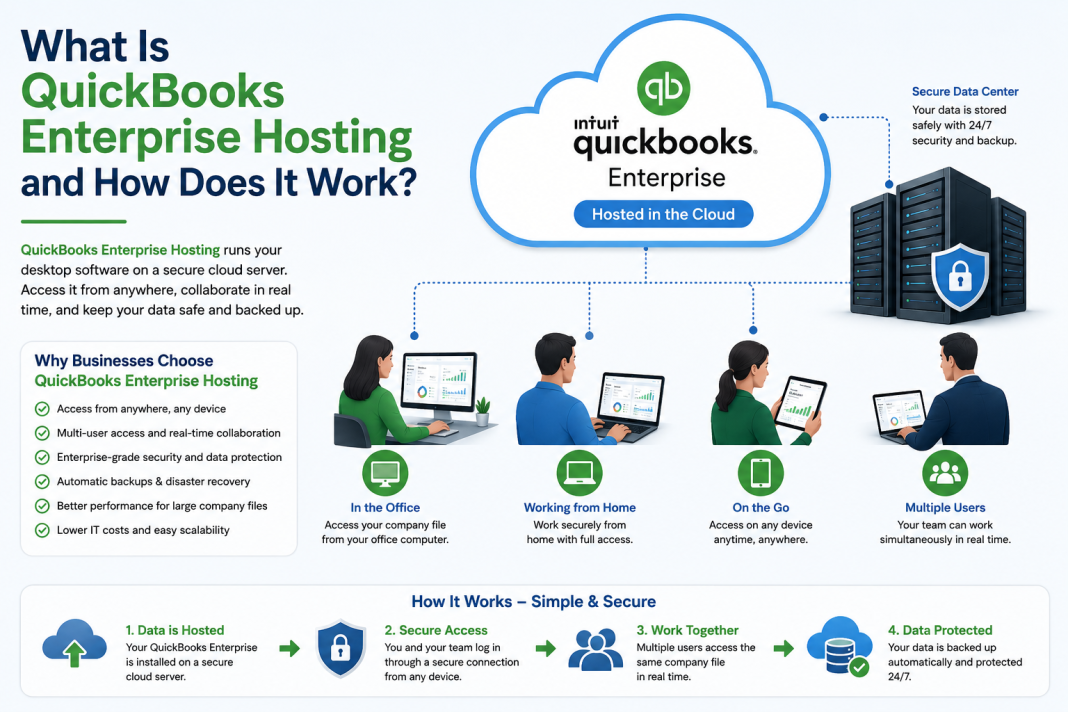
QuickBooks Enterprise Hosting means your QuickBooks Enterprise software runs on a remote cloud server managed by a hosting provider. You and your team access the software through a secure login from any device Windows, macOS, tablets, or even a mobile browser.
You still use the full desktop version, but it works like a cloud application. This setup blends traditional desktop features with the convenience of cloud access.
The hosting provider manages the server, security, backups, and updates so you can focus on accounting tasks instead of IT work.
How QuickBooks Enterprise Hosting Works
Although the user experience feels simple, the backend system involves several layers that ensure safe and fast performance. Here’s how the process works, step by step:
1. Software Installation on a Cloud Server
The hosting provider installs QuickBooks Enterprise on a virtual cloud server. This server is created specifically for your business, and it functions like a high-performance computer stored in a secure data center.
Depending on your needs, the provider may assign the following:
- A dedicated server
- A shared server
- A virtual private server (VPS)
Regardless of the setup, you get your own environment where only authorized team members can access your company files.
2. Secure Remote Access for Users
Team members receive login credentials to access QuickBooks Enterprise through the following:
- A remote desktop application
- A secure web browser
- A cloud portal
Once logged in, the interface looks exactly like the desktop software you’re used to. The difference is that all processing happens on the cloud server rather than your personal device.
This structure allows accountants, bookkeepers, managers, and remote employees to work simultaneously from different locations without performance issues.
3. Data Hosting in a Protected Cloud Environment
All files company data, reports, backups, and system logs are stored in a cloud data center. Hosting providers typically use Tier-III or Tier-IV data centers, which include:
- 24/7 surveillance
- Biometric entry controls
- Redundant power supply
- Multiple network connections
This setup prevents downtime and ensures constant availability of your accounting system.
4. Real-Time Collaboration for Multi-User Teams
QuickBooks Enterprise supports multiple users, but local installations often struggle with speed and file access conflicts. Cloud hosting solves this by enabling concurrent access with streamlined performance.
Users can:
- Work in the same company file at the same time
- Update transactions instantly
- View changes in real time
- Access accurate, updated data without sync delays
For businesses with dispersed teams or multiple departments, this collaborative structure reduces workflow friction and accelerates financial processes.
5. Automated Backups and Disaster Protection
Hosting platforms run automated backups daily, sometimes multiple times per day. These backups store copies of your company files in different physical locations, guaranteeing data recovery even in the following situations:
- Hardware failure
- File corruption
- Natural disasters
- Accidental deletion
- Office network issues
Restoring files becomes quick and simple, preventing productivity loss.
6. High-Level Security Designed for Financial Data
Cloud providers design their platforms around strict security standards to protect sensitive information such as payroll, bank details, vendor records, and tax documents.
Typical security features include the following:
- 256-bit data encryption
- Firewall protection
- Intrusion monitoring
- Multi-factor authentication
- Network isolation
- Server hardening
This level of protection far exceeds what most small and mid-sized businesses can maintain on local servers.
7. Integration With Third-Party Applications
Many companies rely on additional tools such as the following:
- Inventory management software
- CRM platforms
- Payroll systems
- eCommerce integrations
- Tax tools
When QuickBooks Enterprise is hosted, it can connect to these applications through the cloud without affecting performance. This connectivity supports smooth workflows and reduces manual data entry.
Why Businesses Choose QuickBooks Enterprise Hosting
The shift toward cloud hosting continues to grow because it solves everyday accounting challenges. Some of the main benefits include:
1. Work From Any Location
You are no longer limited by your office network or physical hardware. Work from home, travel, or move between branches without worrying about version conflicts or file access restrictions.
2. Predictable IT Costs
You no longer need to manage:
- Local servers
- Hardware upgrades
- Maintenance tasks
- Complex installations
- Troubleshooting issues
The hosting provider handles everything under a predictable monthly or yearly plan.
3. Better Performance for Large Files
QuickBooks Enterprise supports large company files, but local computers often slow down under heavy load. Cloud servers offer greater RAM, processing power, and SSD storage, resulting in faster speed and smoother navigation.
4. Stronger Business Continuity
If a computer breaks or an office network goes down, your team can still log in from another device. Your accounting operation keeps moving without disruption.
5. Streamlined Audit and Compliance Processes
Hosted environments allow secure file sharing, controlled user permissions, and detailed activity logs. These features simplify internal audits, improve transparency, and reduce errors.
6. Centralized Data for Multi-Location Teams
Companies with multiple offices or remote workers benefit from a single centralized platform where everyone works with the same information. This prevents duplicate files and ensures accurate reporting.
Who Should Use QuickBooks Enterprise Hosting?
QuickBooks Enterprise Hosting suits businesses that need power, mobility, and reliable multi-user access. It works especially well for:
- Growing companies
- Multi-location operations
- Construction firms
- Manufacturing organizations
- Retail companies with large inventory
- Accounting firms
- Nonprofits
- Businesses with remote or hybrid teams
If your work involves heavy data files, frequent updates, or multiple team members in QuickBooks throughout the day, hosting delivers smoother operations and stronger performance.
Final Thoughts
QuickBooks Enterprise Hosting gives companies a smart way to use the desktop power of QuickBooks Enterprise with the freedom of cloud technology. It simplifies access, strengthens security, speeds up performance, and supports real-time collaboration. Instead of struggling with hardware limits or installation issues, your team works from any location with a reliable, secure, and scalable system.
By shifting QuickBooks Enterprise to the cloud, businesses stay efficient, connected, and prepared for future growth without changing the familiar workflows they rely on.